This online book contains the lecture notes for the course COMP 1701 - Introduction to Problem Solving and Programming at Mount Royal University.
This course provides an introduction to problem solving in the context of computer programming. The course emphasizes fundamental algorithmic solutions and implementation of those solutions using a practical programming language. Topics include data representation, program control, file handling and elementary data structures. Check the course info.
The contents of this book have been extracted from these references.
Instructor: Masoud Karimi Fatemi
References
Question Bank
137 questions total.
Last updated Dec. 10th, 2024.
1. Trace the following algorithm and write down the output (if any). What does the algorithm do?
For tracing, assume the input is 10 - 4.
1. Read a
2. Read b
3. Repeat 4-6 until b is 0:
4.      let temp = b
5.      b = a mod b
6.      a = temp
7. Write a
2. Trace the following algorithm and write down the output (if any). What does the algorithm do?
For tracing, assume the input is 13.
1. Read number
2. If number <= 1:
3.      Write "No"
4. Else if number == 2:
5.      Write "Yes"
6. Else:
7.      let i = 2
8.      let sqrt = square root of number in integer (whole number)
9.      Repeat 10-14 as long as i <= sqrt:
10.         let m = number mod i
11.         if m == 0:
12.             Write "No"
13.             Go to line 16
14.         increment i
15.     Write "Yes"
16. End
3. What's the output of this code?
print ("Hello, world!")
Hello, world!- Error. The code doesn't run.
- Code runs but no output.
4. What's the output of this code?
Print("Hello, World!")
Hello, World!- Error. The code doesn't run.
- Code runs but no output.
5. What's the output of this code?
print('Hi there, I'm Data!')
Hi there, I'm Data!- Error. The code doesn't run.
- Code runs but no output.
6. What's the output of this code?
print("Hi there, I'm Data!")
Hi there, I'm Data!- Error. The code doesn't run.
- Code runs but no output.
7. What's the output of this code?
number = 6
print("number is {number}.")
number is 6.number is {number}.- Error. The code doesn't run.
- Code runs but no output.
8. What's the output of this code?
number = 6
print(f"number is {number}.")
number is 6.number is {number}.- Error. The code doesn't run.
- Code runs but no output.
9. What's the output of this code?
def fact():
    print("TED talks are highly overrated!")
TED talks are highly overrated!- Error. Code doesn't run.
- Code runs but no output.
10. What does the following function return? Choose the best answer.
def yell():
    print("yellinggggggggg!")
yellinggggggggg!None- Nothing
- There's syntax error.
11. Assuming we have the following code, which code snippet outputs the desired table:
captain = "Jean-Luc Picard"
first_officer = "William Riker"
ship_counsellor = "Deanna Troi"
Desired Table:
    Captain      |  First Officer   | Ship Counsellor
Jean-Luc Picard  |  William Riker   |   Deanna Troi
-
table = f"""\ {'Captain':^16} | {'First Officer':^16} | {'Ship Counsellor':^16} {captain:^16} | {first_officer:^16} | {ship_counsellor:^16} """ print(table) -
table = f"""\ {'Captain':<16} | {'First Officer':<16} | {'Ship Counsellor':<16} {captain:<16} | {first_officer:<16} | {ship_counsellor:<16} """ print(table) -
 table = f"""\
 Captain | First Officer | Ship Counsellor
 {captain} | {first_officer} | {ship_counsellor}
 """
 print(table)
12. What's the output of this code if the input is 15?
number = input("Give me a number: ")
half = number // 2
print(f"half of {number} is {half}.")
half of 15 is 7.half of 15 is 7.5.- Error. The code doesn't run.
- Code runs, but no output.
13. What's wrong with the following code and how to fix it?
number = input("Give me a number: ")
half = number // 2
print(f"half of {number} is {half}.")
14. According to Python's conventions, which one is a good name for a variable?
largetsNumberLARGEST_NUMBERlargest_numberLargestNumber
15. According to Python's conventions, which one is a good name for a constant?
gravitational_pullGravitational_PullGravitationalPullGRAVITATIONAL_PULL
16. Which one is correct?
- We can have constants in Python
- Only if we follow the naming rule (all uppercase), we can have constants in Python
- Even if we follow the naming rule, we still can't have constants in Python
17. What's the output of the following code?
CONSTANT = 10
CONSTANT = CONSTANT + 1
print(f"{CONSTANT=}")
- Error. Code doesn't run
CONSTANT=11CONSTANT=10- Code runs but no output
18. How to get the last character of a string variable named text? Choose all correct answers.
text[0]text[-1]text[len(text)]text[len(text)-1]
19. Write a Python program that takes a text from the user and prints out the first, middle, and last characters.
Examples:
for Chimichanga:
First character: 'C' - Middle character: 'c' - Last character: 'a'
for Batman:
First character: 'B' - Middle character: 'm' - Last character: 'n'
20. Write a Python program that achieves the previous goal, but now with a function named get_character_at_position that takes two arguments: text and position and returns the character of the text at position position. The output of both programs must be the same.
21. Which of the following is a valid variable name in Python?
2nd_placefirst-placefirstPlaceNone
22. Which of the following is NOT a valid Python variable name?
total_sumclass_variablemyVar
23. Which of the following contains an invalid character for a variable name?
amount_owedtotal$amount_countvar123
24. Which of the following variable names is invalid in Python?
ageAgeAGEdef
25. Which of the following is a valid function name in Python?
2calculate()Calculate_sum()calculate-sum()def()
26. Which of the following follows Python's recommended convention for naming functions?
calculateArea()CalculateArea()calculate_area()
27. Which of the following contains an invalid character for a function name?
get_value()calculate-sum()fetchData()_process()
28. What's true about the following function? Select all correct answers.
def cut_number_in_half(number: int) -> int:
    return number / 2
- It's a void function
- It's a value-returning function
- Its name follows Python's conventions
- Its name does NOT follow Python's conventions
- It returns an
intas the type hint suggests - It does NOT return an
int, producing an error in runtime - It does NOT return an
int, but the code runs ok
29. What's the output of the following code for this input: 10 and 2?
number_1 = int(input("Give me a number: "))
number_2 = float(input("Give me another one: "))
mul = number_1 * number_2
print(f"result is {mul} and the type is {type(mul)}.")
result is 20.0 and the type is <class 'float'>.result is 20 and the type is <class 'int'>.result is 20.0 and the type is <class 'int'>.result is 20 and the type is <class 'float'>.
30. What's the output of the following code for this input: 10 and 2?
number_1 = int(input("Give me a number: "))
number_2 = int(input("Give me another one: "))
div = number_1 / number_2
print(f"result is {div} and the type is {type(div)}.")
result is 5.0 and the type is <class 'float'>.result is 5.0 and the type is <class 'int'>.result is 5 and the type is <class 'float'>.result is 5 and the type is <class 'int'>.
31. Which of the following functions are value-returning? Select all correct answers.
int()print()type()input()
32. Which of the following functions are void functions? Select all correct answers.
float()print()strip()replace()
33. Write a Python program that reads a number as the radius and calculates and prints out the area of the circle. Declare PI as a constant with the value of 3.14 in the program. The area must have the precision of 2 digits after the decimal point. No need to use functions.
Example:
Give me the radius: 5
The area of the circle: 78.50
Give me the radius: 6.5
The area of the circle: 132.66
34. Write the same program to calcualte the area of a circle, but now with a function named calculate_circle_area that take the radius and returns the area. The output must be identical to that of the previous problem.
35. Algorithms generally have which of the following? Select all that apply.
- Inputs
- Outputs
- Instructions
- Terminal
- Graphical User Interface
- Purpose
36. Which of the following are optional when it comes to algorithms? Select all that apply.
- Inputs
- Outputs
- Purpose
- Instructions
37. Which of the following is NOT a building block of algorithms? Select all that apply.
- Loops
- Constants
- Classes
- Functions
- Decision
- Variables
38. Pseudocode uses building blocks such as Functions.
- True
- False
39. What does completeness mean in an algorithm? Choose the best answer.
- The algorithm finishes successfully
- The algorithm works
- The algorithm is finite
- The algorithm produces correct outputs for all possible inputs
40. What does finiteness mean in an algorithm? Choose the best answer.
- The algorithm works
- The algorithm stops after a finite number of steps
- The algorithm succeeds fast
- The algorithm is efficient
41. What does it mean to trace an algorithm?
42. Which one is an example of Non-volatile memory in a computer? Select all that apply.
- Hard disk
- RAM
- Flash Memory
- Database
43. Which one is an example of volatile memory in a computer? Select all that apply.
- Hard disk
- RAM
- Flash Memory
- Database
44. What does the ALU do in a computer?
- Processing inputs
- Creating pixels
- Doing math and logic
- Decoding instructions
45. Which one is not a feature of high level programming languages? Select all that apply.
- Easier to read
- Slow execution
- Closer to the CPU
- Fast execution
46. Which one is not a feature of low level programming languages? Select all that apply.
- Easier to read
- Slow execution
- Closer to the CPU
- Fast execution
47. Python is a ________ level programming language.
- High
- Low
48. Assembly is a ________ level programming language.
- High
- Low
49. Python is a(n) _________ programming language.
- Compiled
- Interpreted
50. C++ is a(n) _________ programming language.
- Compiled
- Interpreted
51. Interpreters turn programs into machine code in runtime.
- True
- False
52. Compilers turn programs into machine code in runtime.
- True
- False
53. Which functions are among Python's built-in functions? Select all that apply.
printtypesinfloat
54. Which functions are among Python's functions from the standard library? Select all that apply.
printtypesinfloatsqrt
55. You need to explicitly import functions from the standard library before using them in your program.
- True
- False
56. You need to explicitly import built-in functions before using them in your program.
- True
- False
57. Which one is the modulo operator in Python?
///%\\**
58. Which one is the exponent operator in Python?
///%\\**
59. Which one is the division operator in Python?
///%\\**
60. Which one is the integer division operator in Python?
///%\\**
61. What is the output of this code?
number = 4
result = number / 2
print(result)
22.0- Error
- No output
62. What is the output of this code?
number = 4
result = number // 2
print(result)
22.0- Error
- No output
63. What is the output of this code?
number = 4
result = number % 2
print(result)
00.0- Error
- No output
64. What is the output of this code?
number = 4.0
result = number % 2
print(result)
00.0- Error
- No output
65. What is the output of this code?
a = 2
b = 3.0
result = a + b
print(type(result))
<class 'float'><class 'int'><class 'bool'><class 'str'>- No output
- Error
66. What is the output of this code?
a = 2
b = 3
result = a + b
print(type(result))
<class 'float'><class 'int'><class 'bool'><class 'str'>- No output
- Error
67. What is the output of this code?
a = 2
b = '3'
result = a + b
print(type(result))
<class 'float'><class 'int'><class 'bool'><class 'str'>- No output
- Error
68. What is the output of this code?
a = '2'
b = '3'
result = a + b
print(type(result))
<class 'float'><class 'int'><class 'bool'><class 'str'>- No output
- Error
69. What is the output of this code?
a = '2'
b = '3'
result = a + b
print(result)
- No output
- Error
523
70. What is the output of this code?
a = True
b = '3'
result = a + b
print(result)
- No output
- Error
True3
71. A variable data type can change in a Python program.
- True
- False
72. What's the data type of the variable result?
a = 2
b = 3.2
result = a + b
intfloatboolstr
73. What's the data type of the variable result?
a = 2
b = 3.2
result = a - b
intfloatboolstr
74. What's the data type of the variable result?
a = 2
b = 3.2
result = a * b
intfloatboolstr
75. What's the data type of the variable result?
a = 2
b = 3.2
result = a / b
intfloatboolstr
76. What's the data type of the variable result?
a = 2
b = 3.2
result = a // b
intfloatboolstr
77. What's the data type of the variable result?
a = 2
b = 3.2
result = a % b
intfloatboolstr
78. What's the data type of the variable result?
a = 2
b = 3.2
result = b % a
intfloatboolstr
79. What's the data type of the variable result?
a = 2
b = 3.2
result = a ** b
intfloatboolstr
80. What's the data type of the variable result?
a = 2
b = 3.2
result = b ** a
intfloatboolstr
81. What's the output of this program?
a = 2
str_a = str(a)
print(type(str_a), str_a)
<class 'str'> 2.0<class 'str'> 2<class 'int'> 2.0<class 'int'> 2- No output
- Error
82. What's the output of this program?
a = 2.5
str_a = str(a)
print(type(str_a), str_a)
<class 'str'> 2.5<class 'str'> 2<class 'float'> 2.5<class 'float'> 2.0- No output
- Error
83. What's the output of this program?
a = "5.5"
int_a = int(a)
print(type(int_a), int_a)
<class 'int'> 5<class 'int'> 5.5<class 'str'> 5<class 'str'> 5.5- No output
- Error
84. What's the output of this program?
a = "5"
int_a = int(a)
print(type(int_a), int_a)
<class 'int'> 5<class 'int'> 5.0<class 'str'> 5<class 'str'> 5.0- No output
- Error
85. What's the output of this program?
a = "5.6"
float_a = float(a)
print(type(float_a), float_a)
<class 'float'> 5<class 'float'> 5.6<class 'str'> 5<class 'str'> 5.6- No output
- Error
86. What's the output of this program?
a = "5.6"
result = bool(a)
print(type(result), result)
<class 'bool'> True<class 'bool'> False- No output
- Error
87. What's the output of this program?
a = "0.0"
result = bool(a)
print(type(result), result)
<class 'bool'> True<class 'bool'> False- No output
- Error
88. What's the output of this program?
a = "False"
result = bool(a)
print(type(result), result)
<class 'bool'> True<class 'bool'> False- No output
- Error
89. What's the output of this program?
a = "   "
result = bool(a)
print(type(result), result)
<class 'bool'> True<class 'bool'> False- No output
- Error
90. What's the output of this program?
a = ""
result = bool(a)
print(type(result), result)
<class 'bool'> True<class 'bool'> False- No output
- Error
91. Write a Python program that takes a diameter from the input and prints out the area of the circle in 2 digits precision. Example:
Enter diameter: 9.8
Area of the circle: 75.43
92. In the following function definition, how many variables are local to the function scope?
def add_2_numbers(x: float, y: float) -> None:
    the_sum = x + y
    print(the_sum)
- 0
- 1
- 2
- 3
- 4
93. In the following function definition, what do we call x and y?
def add_2_numbers(x: float, y: float) -> None:
    the_sum = x + y
    print(the_sum)
- Arguments
- Parameters
- Headers
- Type Hints
94. In the following function definition, what do we call float and None?
def add_2_numbers(x: float, y: float) -> None:
    the_sum = x + y
    print(the_sum)
- Arguments
- Parameters
- Headers
- Type Hints
95. In the following function definition and call, what do we call 2 and 3.5?
def add_2_numbers(x: float, y: float) -> None:
    the_sum = x + y
    print(the_sum)

add_2_numbers(2, 3.5)
- Arguments
- Parameters
- Headers
- Type Hints
96. In the following function definition, what does the function add_2_numbers return?
def add_2_numbers(x: float, y: float) -> None:
    the_sum = x + y
    print(the_sum)
floatintNonestr
97. What is the output of this program?
def add_2_numbers(x: float, y: float) -> None:
    the_sum = x + y
    print(the_sum)

result = add_2_numbers(3, 4.5)
print(f"result is {result:.2f}")
-
7.5 result is 7.5 -
7.5 result is None - Error
- No output
98. What is the output of this program?
def add_2_numbers(x: float, y: float) -> None:
    the_sum = x + y
    print(the_sum)

add_2_numbers(3)
33.0- Error
- No output
99. What is the output of this program?
def add_2_numbers(x: float, y: float) -> None:
    the_sum = x + y
    print(the_sum)

add_2_numbers()
00.0- Error
- No output
100. In the following code, what do we call the description on line 2?
1. def add_2_numbers(x: float, y: float) -> None:
2.    "Adds two numbers"
3.    the_sum = x + y
4.    print(the_sum)
- Documentation
- docstring
- Function definition
- Fundtion body
101. What's the output of the following code?
def subtract(a: int, b: int) -> None:
    sub = a - b

a = 10
b = 12
subtract(a, b)
print(f"Result of subtraction is {sub}")
Result of subtraction is -2Result of subtraction is 2- Error
- No output
102. What will be printed when this code segment runs?
count = 4
while count != 0 and count < 10:
    count -= 1
    if count == 2:
        break
print(count)
- 0
- 1
- 2
- 3
- This is an infinite loop
103. What will be printed when this code segment runs?
num = 7
while num <= 10:
    if num % 2 == 0:
        num += 1
    else:
        num -= 2
print(num)
- 5
- 6
- 9
- 10
- This is an infinite loop
104. What will be printed when this code segment runs?
value = 1
while value < 100:
    value *= 3
    if value > 30:
        break
print(value)
- 27
- 30
- 81
- 100
- This is an infinite loop
105. What will be printed when this code segment runs?
n = 1
while n != 5:
    n += 1
    if n % 2 == 0:
        n += 1
print(n)
- 4
- 5
- 6
- 7
- This is an infinite loop
106. What kind of error this code segment has?
name = "Batman"
print(name[0], name[5], name[10])
- syntax error
- semantic error
- run-time error
- logic error
- no error
107. What kind of error this code segment has?
from math import pi

def area(diameter: float) -> float
    return pi * (diameter / 2) ** 2
- syntax error
- semantic error
- run-time error
- logic error
- no error
108. What kind of error this code segment has?
def add(a: int, b: int) -> int:
    return a + b

def main() -> None:
    print("program starts")
    add(5)
    print("program ends")

main()
- syntax error
- semantic error
- run-time error
- logic error
- no error
109. What kind of error this code segment could have, assuming the user enters a valid integer?
from math import sqrt

def main() -> None:
    number = int(input("Enter number: "))
    result = sqrt(number)
    print(f"Square root of {number} is {result:.2f}")

main()
- syntax error
- semantic error
- run-time error
- logic error
- no error
110. What kind of error this code segment could have, assuming the user enters valid floats?
def floor_division(a: float, b: float) -> float:
    return a // b


def main() -> None:
    a = float(input("Enter number 1: "))
    b = float(input("Enter number 2: "))
    print(f"Floor division of {a} and {b} is {floor_division(a, b):.2f}")


main()
- syntax error
- semantic error
- run-time error
- logic error
- no error
111. What kind of error this code segment could have, assuming the user enters valid integers?
count = 0
number = int(input("Enter a number: "))

while number != -1:
    num = int(input("Enter a number: "))
    count += 1

print(f"You entered the total of {count} numbers")
- syntax error
- semantic error
- run-time error
- logic error
- no error
112. Implement the pseudocode in question 1 in Python. The algorithm finds the Greatest Common Divisor (GCD) of two integers. Use a while loop.
113. Implement the pseudocode in question 2 in Python. The algorithm prints Yes if the input is a prime number, and No if it's not. Use a while loop and break.
114. What kind of error this code segment could have, assuming the user enters a valid integer?
x = int(input("Enter a number: "))

if x = 2:
    print("You guessed correctly")
else:
    print("You guessed incorrectly")
- syntax error
- semantic error
- run-time error
- logic error
- no error
115. For all possible values of x, y, and z, which expression is equivalent to the following? (i.e.
they both evaluate to the same value)
not (x != y) and y == z
x < y and y < zx > y and y >= zx != y or y == zx == y or y <= zx == y and y == z
116. For all possible values of x, y, and z, which expression is equivalent to the following? (i.e.
not (x <= y or y < z)
x < y and y < zx > y and y >= zx != y or y == zx == y or y <= zx == y and y == z
117. For all possible values of x, y, and z, which expression is equivalent to the following? (i.e.
(y < z or y == z) or x == y
x < y and y < zx > y and y >= zx != y or y == zx == y or y <= zx == y and y == z
118. For all possible values of x, y, and z, which expression is equivalent to the following? (i.e.
not (x >= y) and not (y >= z)
x < y and y < zx > y and y >= zx != y or y == zx == y or y <= zx == y and y == z
119. For all possible values of x, y, and z, which expression is equivalent to the following? (i.e.
not (x == y and y != z)
x < y and y < zx > y and y >= zx != y or y == zx == y or y <= zx == y and y == z
120. What is the output of the following code segment?
def starfleet_rank(points: int) -> str:
    """Convert points to a Starfleet rank."""
    if points >= 50:
        rank = "Ensign"
    elif points >= 60:
        rank = "Lieutenant"
    elif points >= 70:
        rank = "Commander"
    else:
        rank = "Captain"
    return rank

def main() -> None:
    print(starfleet_rank(65))
    print(starfleet_rank(75))
    print(starfleet_rank(85))

main()
121. What is the output of the following code segment?
def starfleet_rank(points: int) -> str:
    """Convert points to a Starfleet rank."""
    if points >= 50:
        rank = "Ensign"
    if points >= 60:
        rank = "Lieutenant"
    if points >= 70:
        rank = "Commander"
    else:
        rank = "Captain"
    return rank

def main() -> None:
    print(starfleet_rank(55))
    print(starfleet_rank(75))
    print(starfleet_rank(85))

main()
122. What is the output of the following code segment?
a = [1, 2, 3]
b = a
b.append(4)
print(a, b)
123. What is the output of the following code segment?
a = 5
b = a
b += 1
print(a, b)
124. What is the output of the following code segment?
def some_func(param: list) -> None:
  param.append(5 + 6)

def main() -> None:
  my_list = list(range(5))
  some_func(my_list)
  print(my_list)

main()
125. What is the output of the following code segment?
a = [1, 2, 3]
b = a
b = list(range(5))
b.append(4)
print(a, b)
126. What is the output of the following code segment?
a = [1, 2, 3]
b = a
b = list(range(5))
print(id(a) == id(b))
127. What is the output of the following code segment?
a = [1, 2, 3]
b = a
b.reverse()
print(id(a) == id(b))
128. What is the output of the following code segment?
def some_func(param: list) -> int:
  param.append(5 + 6)
  return id(param)

def main() -> None:
  my_list = list(range(5))
  ref = some_func(my_list)
  print(id(my_list) == ref)

main()
129. What is the output of the following code segment?
def some_func(param: list) -> int:
  param = [1]
  return id(param)

def main() -> None:
  my_list = list(range(5))
  ref = some_func(my_list)
  print(id(my_list) == ref)

main()
130. What is the output of the following code segment?
name = "batman"
name.upper()
print(name)
131. What is the output of the following code segment?
name = "batman"
name = name.upper()
print(name)
132. What is the output of the following code segment?
name = "batman"
ref_1 = id(name)
name = name.upper()
ref_2 = id(name)
print(ref_1 == ref_2)
133. What is the output of the following code segment?
name = "batman"
name[0] = "B"
print(name)
134. What is the output of the following code segment?
def some_func(param: str) -> None:
  param += "..."

def main() -> None:
  text = "to be continued"
  some_func(text)
  print(text)

main()
135. What is the output of the following code segment?
def some_func(param: str) -> str:
  param += "..."
  return param

def main() -> None:
  text = "to be continued"
  text = some_func(text)
  print(text)

main()
136. What is the output of the following code segment?
def some_func(param: str) -> int:
  param += "..."
  return id(param)

def main() -> None:
  text = "to be continued"
  ref = some_func(text)
  print(id(text) == ref)

main()
137. What is the output of the following code segment?
def some_func(param: int) -> None:
  param += 5

def main() -> None:
  param = 5
  some_func(param)
  print(param)

main()
Solutions
Quiz 01
Pseudocode:
set EXCHANGE_RATE = 1.0984
set FEE = 20
ask for name
ask for amount in CAD
display Hello, user
set result = (amount - FEE) * EXCHANGE_RATE
round result to 2 decimal points
display result
Python code:
EXCHANGE_RATE = 1.0984  # Australian dollars
FEE = 20  # Management fee

name = input("Who are you? ")
amount = float(input("Enter amount in CAD, $20 minimum: "))
print("Hello,", name, ".")

result = (amount - FEE) * EXCHANGE_RATE
result = round(result, 2)
print("Your $", amount, "CAD will buy you", result, "in AUD.")
Quiz 03
def exposure_limit(noise_level: float, base_level=85) -> float:
    '''Args:
        noise_level (float): how loud environment is in dBA
        base_level (float, optional): ‘safe’ level, default = 85 dBA
      Returns:
        float: The permitted duration of exposure, in hrs. -1 if no time limit
    '''
    exposure = noise_level - base_level

    if exposure <= 0:
        result = -1
    else:
        if exposure <= 3:
            result = 4
        else:
            if exposure <= 9:
                result = 1
            else:
                result = 0.25

    return result
Quiz 04
def smallest_items(any_list: list, k: int) -> list:
    """
    Args: any non-empty list of numbers and
    an integer k that must be less than the length of the list
    Returns a sub-list of items from the passed list
    that the k smallest.
    """
    sorted_list = sorted(any_list)
    return sorted_list[:k]
iteration = 5
while iteration < 26:
    print(iteration)
    iteration += 5

# Is equivalent to this
for iteration in range(5, 26, 5):
    print(iteration)
a = [1,2,3,4,5,6]
for index in range(len(a)-2):
    print(a[index])

# Is equivalent to this
a = [1, 2, 3, 4, 5, 6]
index = 0
while index < len(a) - 2:
    print(a[index])
    index += 1
List c looks like: [[4, 40], [3, 30], [2, 20], [1, 10]]
and the value at c[2][0] has a value of: 2
Quiz 05
def csv_to_2d_list(filename: str) -> list[list]:
    """
    Takes a csv filename as string and turns it into a 2D list.
    Returns a 2D list.
    """
    result = []
    f = open(filename, "r")

    for line in f:
        line = line.strip()
        columns = line.split(",")
        row = []

        for item in columns:
            item = item.strip()

            if item.lower() == "yes":
                row.append(True)
            elif item.lower() == "no":
                row.append(False)
            else:
                try:
                    number = int(item)
                    row.append(number)
                except ValueError:
                    row.append(item)

        result.append(row)

    f.close()
    return result


def swap_col_rows(data: list[list], filename: str) -> None:
    """
    Swaps rows and columns of a given 2D list and
    writes the content into a file with each row on a separate line.
    """
    num_cols = len(data[0])
    num_rows = len(data)

    swapped = []

    for col_index in range(num_cols):
        row = []
        for row_index in range(num_rows):
            row.append(data[row_index][col_index])
        swapped.append(row)

    f = open(filename, "w")
    for row in swapped:
        row_list = []
        for item in row:
            row_list.append(str(item))
        f.write(",".join(row_list) + "\n")
    f.close()


def main() -> None:
    result = csv_to_2d_list("marx.csv")
    swap_col_rows(result, "brothers.csv")


main()
Common Mistakes
Multiple Returns
Once you return from a function, you can't return again.
| Bad | Good |
|---|---|
|
|
Python is Case-sensitive
int is valid, Int is not. None is valid, none is not.
| Invalid (Error) | Valid |
|---|---|
|
|
Unless a Parameter Has a Default Value, It's Mandatory to Pass It
When you declare a function, you can specify a number of parameters it receives. Unless a parameter has a default value (we'll see how later in the course), you must pass an argument for it; otherwise, the code won't run. (There are some other types of parameters that are exceptions and we'll talk about them later in the course)
| Invalid (Error) | Valid |
|---|---|
|
|
Indentation is a Big Deal in Python
Proper indentation is a must for a Python program. Wrong indentation will result in either errors or unexpected behavior.
Indentation is how you specify if a block of code belongs to a structure (like a function).
| Invalid (Error) | Valid |
|---|---|
|
|
String Concatenation
You can use the + operator to concat two strings (see lecture notes), but both sides need to be strings for it to work.
| Invalid (Error) | Valid |
|---|---|
|
|
Floor Division
This operator // in Python is called floor division or integer division. Although the result value is always a whole integer, the result’s type is not necessarily int. If one or both sides are float, the type of the result is float.
Examples:
a = 6
b = 4
result = a / b # 1.5 (type of result is float)
result = a // b # 1 (whole integer. type is also int because both sides are int)
a = 6.0
b = 4
result = a / b # 1.5 (type of result is float)
result = a // b # 1.0 (whole integer, but type is float because a is float)
Data Types vs. Values
Value is what a variable holds; data type is the type of the value a variable holds. Don't confuse them.
Example:
a = 2
# Value of a is 2
# Data type of a is int

b = "hello"
# Value of b is 'hello'
# Data type of b is str
Void Functions vs. Value Returning
For functions that we declare ourselves, it's clear: if a function has a return statement, it's value-returning. But for built-in functions, such as print and input and float, we don't see their body of code (not unless you check the Python source code). So, you can't use the previous trick. For these functions, you need to know their purpose and how to use them first, and then decide if they're returning anything or not. The rule of thumb here is that if you can assign the result of a function call to a variable and it's not None, then it's value returning.
var_1 = print("hi")
print(var_1) # prints None

var_2 = float(2)
print(var_2) # prints 2.0
Python's Naming Conventions
When it comes to naming variables and functions, the Python convention is to use all lowercase letters, joined by underscore _. Except for constants where the convention is to use all-caps letters.
| Bad | Good |
|---|---|
|
|
Function Scope
Remember that Python has a scope for each variable. If a variable is defined inside a function (whether explicitly or as a parameter), that variable lives inside the function and dies (gets removed) when the function finishes (returns). When you send an argument (of the types we've seen so far) to a Python's function, a copy of it gets sent. So, no matter what you do with that argument inside the function, the original variable is not affected.
Example:
def make_number_half(number: int) -> int:
  number = number // 2
  print(number)

number = 10
make_number_half(number) # prints 5
print(number) # prints 10, because the original number is not affected by the function
See the code execution visualized here. Click on Next > to execute lines one by one.
Git 101
For every software project, we need a tool to keep our files safe, retain a history of changes, attribute those changes to their authors, and have a seamless collaboration between team members. We also want the tool to be fast and easy to use. Git delivers all that.
Git
A Git project is referred to as a "repository," which contains the complete history of the project from the beginning. A repository consists of individual snapshots called "commits." A single commit includes:
The project tree
A structure of nested files and directories representing a complete state of the project:
project
│   README.md
│   file001.txt
│
└───folder1
│   │   file011.txt
│   │   file012.txt
│   │
│   └───subfolder1
│       │   file111.txt
│       │   file112.txt
│       │   ...
│
└───folder2
    │   file021.txt
    │   file022.txt
The "author"
Name, email address, and date/time indicating who made the changes that resulted in this project state and when.
The "committer"
The same information about the person who added this commit to the repository (which may be different from the author).
Note: author and committer will refer to the same person if you're working on a Git project alone. In group projects, however, they could refer to different people (or even bots!).
A "commit message"
Text used to comment on the changes made by the commit.
The following figure shows a Git project containing one branch (Main) and 4 snapshots (commits).
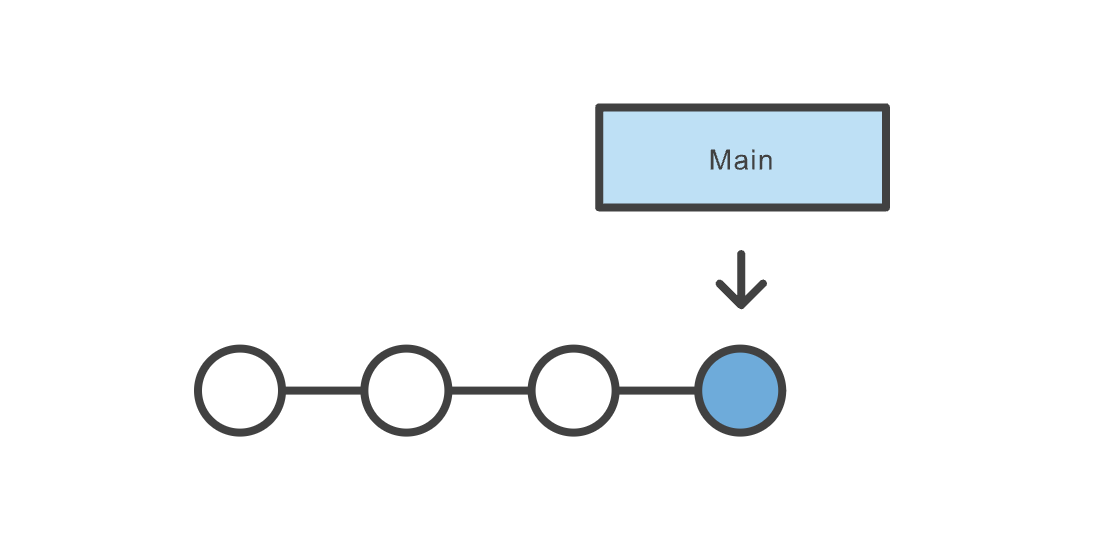
Image Credit: Atlassian
Download and Install Git
First, there's a chance you already have Git installed on your system. To make sure, open up a Terminal (command-line) and try this command:
git --version
If you see a Git version showing up, you can skip this step. If not, refer to this tutorial on how to install Git based on your operating system.
Turning a Folder Into a Git Project
In order to turn a folder into a Git project, first cd to the folder in your Terminal: cd /your/folder. Then run git init. If successful, the folder is now tracked via Git. You should also be able to see a hidden folder named .git in your root directory: ls -la.
Create Snapshots (commits)
In order to create snapshots in a Git project, you need to first stage your changes, as commits only create snapshots of the changes already staged within a project. To stage a file, run git add <file-name>. You can also use the handy git add -A command to stage everything in the project. To create a snapshot of staged files and folders, use the git commit -m "commit message" command. The commit message could be anything, but it's highly recommended to put something meaningful, especially if you're working in a team, as it makes it easier to follow changes later.
Check the Status of a Project
You can use the git status to check the status of a project. Note that you need to be inside the Git project for the command to work. Here's a sample output of the command:
On branch main
Your branch is up to date with 'origin/main'.

Changes not staged for commit:
  (use "git add <file>..." to update what will be committed)
  (use "git restore <file>..." to discard changes in working directory)
        modified:   git-101/README.md

Untracked files:
  (use "git add <file>..." to include in what will be committed)
        git-101/images/

no changes added to commit (use "git add" and/or "git commit -a")
It tells you which branch you are currently on (main in this case); files not staged yet; and files not being tracked at the moment. To stage a file, or start tracking a file, use the git add <file-name> command.
Branches
When you first turn a directory to a Git project, Git will create a branch named main for you (you can list your branches by using the git branch command). Changes you make (almost) always happen on a branch. A branch is simply a pointer to a commit. That commit in turn can point to a parent commit, then another parent commit, etc.
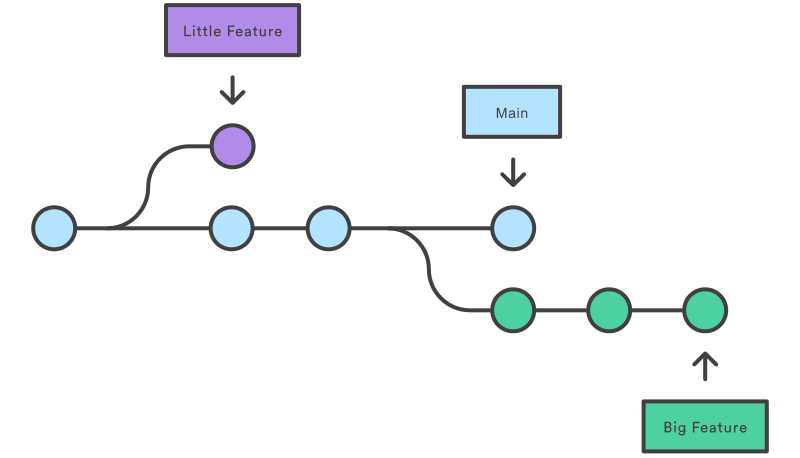
Image Credit: Atlassian
Branches are very important when working in a team. We create branches (or branch off an existing branch, as they say) to work on a new feature, bug fix, etc. while at the same time not interfering with other teammates' works on other branches. When finished, we will merge our branch to a main branch. Note that I said a main branch and not the main branch. In a real-world scenario, typically, there are multiple main branches associated with different environments (for instance: dev, staging, and production). A main branch is a branch that once merged into, will usually trigger a deployment process and change the state of an environment.
In order to create a branch, you can use the git branch <branch-name> command. Note that this will not change the current branch for you. You also need to checkout to the branch using the git checkout <branch-name>. There's also a handy command: git checkout -b <branch-name> which will create the branch and checkout to it in one step.
Remote Repository
Remote repository is a server that holds a central copy of your local repository. A central or remote repository is key to working efficiently in a team, as each team member can pull the latest changes from the central repository and push their changes to it. The following figure shows a central (remote) repository and two collaborators working as a team.
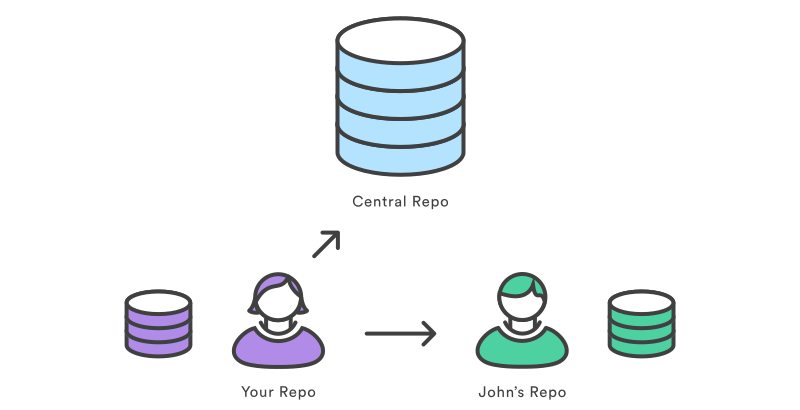
Image Credit: Atlassian
It's convention to name the remote repository origin. To pull the latest changes from the remote repo, use git pull origin <branch-name>, and to push your changes to the remote repo, use git push origin <branch-name>.
Pull Request
A Pull Request (or PR for short) is request to merge your branch (including your latest changes) to a remote branch. Although you may be able to push directly into a branch without creating a PR first, it's always recommended to do so when you're working in a team, as PRs allow collaborators to discuss the changes before merging.
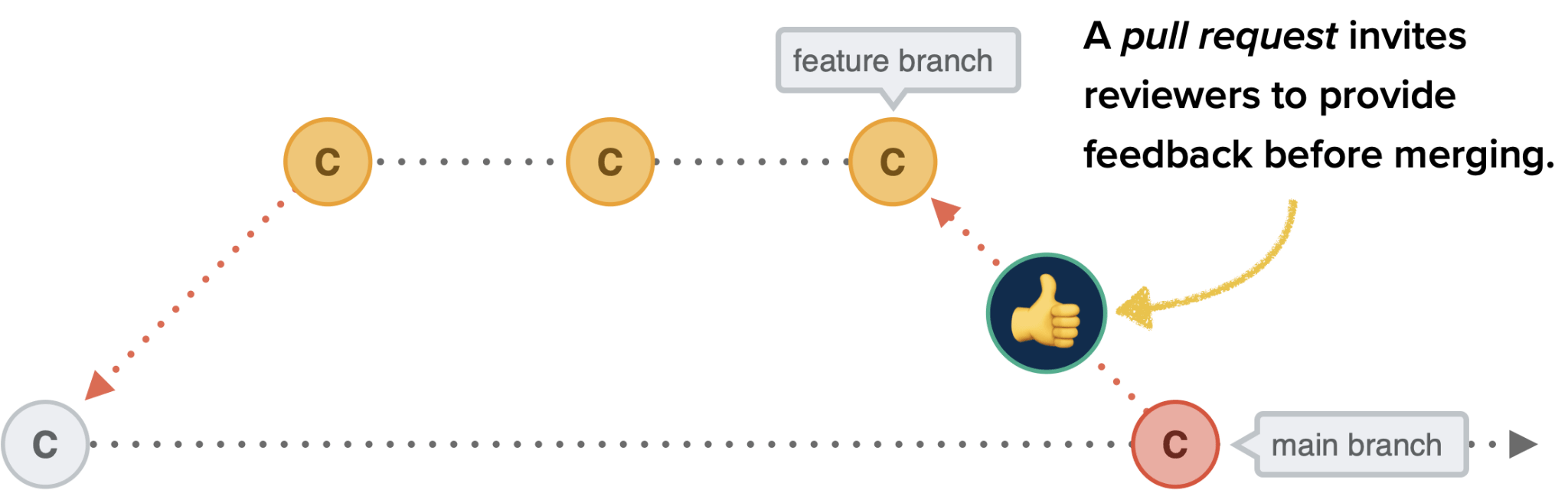
Image Credit: CSS Tricks
Most-used Commands in This Course
# initialize a git repository
git init

# add (stage) all changes
git add -A

# commit staged changes with a message
git commit -m "commit message"

# create a new branch and checkout into it
git checkout -b <branch-name>

# change the current branch to an existing branch
git checkout <branch-name>

# delete a branch
git branch -D <branch-name>

# see commit logs
git log

# see logs in one line
git log --online

# see status of the current local repository
git status

# see the list of local branches
git branch

# see the list of both local and remote branches
git branch -a

# rebase a branch with another one
git rebase <branch-name>

# see remote repositories linked to the current local repository
git remote -v

# add a new origin (remote repository)
git remote add origin <origin-url>

# pull the latest changes from the remote repository
git pull origin <branch-name>

# push a branch to the remote repository
git push origin <branch-name>

# cache GitHub credentials
git config --global credential.helper 'cache --timeout=36000'

# remove git cache
git rm -r --cached .

# set upstream (default remote branch) for a local branch
git push -u origin <branch-name>

# revert a commit
git revert <commit-hash>

# config username and email for a git project
git config user.name "username"
git config user.email "email"
Git cheat sheet
The commands discussed above--and more--are summarized in this cheat sheet available to download.
Python
Strings
Strings are our first example of a Python sequence. In this case, they’re a sequence of characters. Unlike other languages, strings in Python are immutable. You can’t change a string in place, but you can copy parts of strings to another string to get the same effect.
Creating Strings
You can create strings with single quotes '', double quotes "", or triple quotes """""". The interactive interpreter echoes strings with a single quote, but all are treated exactly the same by Python. The print() function doesn't print the quotes.
These are all the same:
text = 'hello'
text = "hello"
text = """hello"""

print(text)
Triple quotes aren’t very useful for short strings like these. Their most common use is to create multiline strings.
text = """If music be the food of love, play on.
Give me excess of it, that, surfeiting,
The appetite may sicken and so die.
"""

print(text)
Create with str()
You can make a string from another data type by using the str() function:
str(98.6)
str(1.0e4)
str(True)
Combine by Using +
We can combine strings using + or even without:
text = "TED talks are highly " + "overrated!"
print(text)

text = "TED talks are highly "  "overrated!"
print(text)
Duplicate with *
We use the * operator to duplicate a string.
me = "Will you marry me?"
her = "Yes!" * 10

print("I said:", me)
print("She said:", her)
Get a Character with []
As mentioned earlier, strings are just a sequence of characters, and in Python, you can access individual items in a sequence using the [] syntax. Note that in Python, as in so many other programming languages, sequence indices start from 0 and not 1!
letters = 'abcdefghijklmnopqrstuvwxyz'
print("first letter of alphabet is:", letters[0])
print("tenth letter of alphabet is:", letters[9])
Be careful about indices. If you ask for an index out of the range of the sequence, you'll get errors:
text = "batman"
print("the tenth character is:", text[10]) # IndexError: string index out of range
We can use negative indices to access characters from the end of the sequence:
letters = 'abcdefghijklmnopqrstuvwxyz'
print("last letter of alphabet is:", letters[-1])
print("third last letter of alphabet is:", letters[-3])
Get a Substring with a Slice
You can extract a substring (a part of a string) from a string by using a slice. Here's the syntax: [start:end:step]. You can omit some of these.
letters = 'abcdefghijklmnopqrstuvwxyz'
print(letters[:]) # will print the whole sequence
print(letters[10:]) # will print the sequence from index 10 forward
print(letters[20:]) # will print the sequence from index 20 forward
print(letters[10:20]) # will print the sequence from index 10 to index 20 (exclusive)
print(letters[-3:]) # will print the last 3 characters
print(letters[-10:]) # will print the last 10 characters
print(letters[18:-3]) # will print the sequence from index 18 to the fourth before the end
print(letters[-6:-3]) # will print the sequence from 6 before the end to 3 before the end
print(letters[::2]) # from start to end, in steps of 2 characters. or every other character
print(letters[19::4]) # from 19 to the end, in steps of 4
Step can be negative:
letters = 'abcdefghijklmnopqrstuvwxyz'
print(letters[::-1]) # prints the sequence in reverse
Slices are more forgiving of bad offsets than are single-index lookups with []. A slice offset earlier than the beginning of a string is treated as 0, and one after the end is treated as -1.
letters = 'abcdefghijklmnopqrstuvwxyz'
print(letters[-50:]) # prints the whole sequence
print(letters[:2024]) # prints the whole sequence
Get Length with len()
You can use the len() built-in function to get the length of a sequence, including a string.
text = "The line must be drawn here! This far, no further!"
print("length of the text is:", len(text))

text = ""
print("length of the text is:", len(text))
Substitute by Using replace()
You use replace() for simple substring substitution. Give it the old substring, the new one, and how many instances of the old substring to replace. It returns the changed string but does not modify the original string.
review = "The latest Matrix movie was awesome!"
correction = review.replace("awesome", "terrible")
print(correction)
# try printing review
without_karimi_coins = "Alan gets B, Alice gets B+, John gets B, Barbara gets B"
with_karimi_coins = without_karimi_coins.replace("B", "A")
print(with_karimi_coins)

with_karimi_coins = without_karimi_coins.replace("B", "A", 1)
print(with_karimi_coins)
Strip with strip()
strip() removes leading and trailing whitespace from a string. There's also lstrip() for removing whitespace from the left of the string and rstrip() for removing whitespace from the right of the string.
text = "    I dare do all that may become a man.    "
print(text.strip())
Search with find() and index()
We can find the offset (index) of a substring using find() and index(). If the substring exists, both return its index, otherwise, index() returns an error, whereas find() returns -1.
text = "look there, that's Waldo!"
print(text.find("Waldo"))
print(text.index("Waldo"))

print(text.find("Batman"))
print(text.index("Batman"))
There's also rfind and rindex to search from the end of a string.
Count Occurances with count()
You can see how many times a substring is repeated by using count().
text = "I am the decider of us three. I decide! Let the decider decide."
print(text.count("decider"))
You can also use the in operator to see if a substring is in a string. It returns True if it is, and False otherwise.
crew = "Superman, Batman, Wonder Woman"
print("Batman" in crew)
print("Flash" in crew)
Change Case
You can use the following methods to change case in a string:
text = "The first rule of Fight Club is: you do not talk about Fight Club."
print(text.lower())
print(text.upper())
print(text.title())
print(text.capitalize())
print(text.swapcase())
Interpolation & Formatting
Interpolation refers to inserting or embedding values or variables within a string. Although there are other ways of interpolating/formatting a string, since Python 3.6, the recommended way is using f-strings. Here's how to use them:
Type the letter f or F directly before the initial quote.
- Type the letter
forFdirectly before the initial quote. - Include variable names or expressions within curly brackets (
{}) to get their values into the string.
adjective_1 = "mindful"
adjective_2 = "demure"
text = f"Very {adjective_1}, very {adjective_2}."
print(text)
You can interpolate any value that's printable. It doesn't have to be a string:
tiktok_followers = 3010
insta_followers = 5618
print(f"I have {tiktok_followers} followers on TikTok & {insta_followers} followers on Instagram")

print(f"1 + 2 = {1+2}") # you can use expressions too
You can also format strings using f-strings. The general rule is: :[alignment][width][,][.precision][type]:
number = 50429.5
print(f"{number:.2f}") # precision & type
print(f"Number is {number:10.2f}.") # width, precision, & type
print(f"Number is {number:<10.2f}.") # alignment, width, precision, & type
print(f"Number is {number:<10,.2f}.") # alignment, width, thousand separator, precision, & type
print(f"Number is {number:e}.") # scientific notation (type)

hours, minutes, seconds = 10, 5, 9 # multiple assignments
print(f"{hours:02d}:{minutes:02d}:{seconds:02d}") # padding with 0s
Starting in Python 3.8, f-strings gain a new shortcut that’s helpful when you want to print variable names as well as their values. This is handy when debugging. The trick is to have a single = after the name in the {}-enclosed part of the f-string:
number = 9
largest = 42
print(f"{number=}, {largest=}")
More String Things
Python has many more string functions. Check them out here.